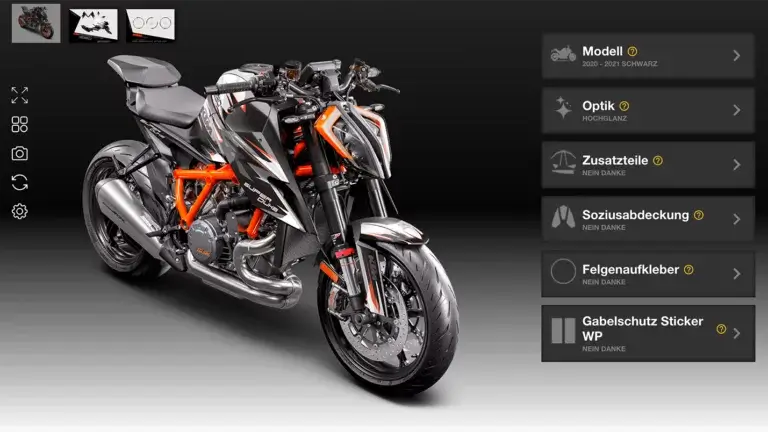





On the left side of the configurator, you’ll find various icons, each with different functions.

With this function, you can hover a magnifying glass over the motorcycle to get a closer look at individual parts.

This function opens a window where you can view and retrieve various saved configurations for inspiration.

Using this function, you can take a photo of your current configuration. The photo will be automatically saved on your computer, tablet, or smartphone.

With this function, you can undo your previously selected configurations if you want to start over.

This function allows you to save your configuration as inspiration. You can later retrieve it using the “Inspiration” function. To do so, you need to create a new group or select an already created group. You can also name your configuration and provide a description for it.
You are currently viewing a placeholder content from Vimeo. To access the actual content, click the button below. Please note that doing so will share data with third-party providers.
More InformationYou are currently viewing a placeholder content from YouTube. To access the actual content, click the button below. Please note that doing so will share data with third-party providers.
More InformationYou need to load content from reCAPTCHA to submit the form. Please note that doing so will share data with third-party providers.
More InformationYou are currently viewing a placeholder content from Facebook. To access the actual content, click the button below. Please note that doing so will share data with third-party providers.
More InformationYou are currently viewing a placeholder content from Google Maps. To access the actual content, click the button below. Please note that doing so will share data with third-party providers.
More InformationYou are currently viewing a placeholder content from Google Maps. To access the actual content, click the button below. Please note that doing so will share data with third-party providers.
More InformationYou are currently viewing a placeholder content from Vimeo. To access the actual content, click the button below. Please note that doing so will share data with third-party providers.
More InformationYou are currently viewing a placeholder content from YouTube. To access the actual content, click the button below. Please note that doing so will share data with third-party providers.
More InformationYou are currently viewing a placeholder content from Instagram. To access the actual content, click the button below. Please note that doing so will share data with third-party providers.
More Information